> For the complete documentation index, see [llms.txt](https://workmate.gitbook.io/workmate-changelog/llms.txt). Markdown versions of documentation pages are available by appending `.md` to page URLs; this page is available as [Markdown](https://workmate.gitbook.io/workmate-changelog/updates/july-27-2026.md).
# July 27, 2026
26.7.27
### **Transfer Order Module**
**Bulk Picking, Sending, and Receiving with Start Activity**
Transfer Orders now have a dedicated activity workflow for processing items in bulk instead of editing line items one page at a time. A new Start Activity button walks staff through picking, sending, and receiving, moving items through their stock transfer statuses as physical work happens in the warehouse. The flow searches line items across every page of a transfer order, not just the current view, and is available on Admin.
* **Guided activity and location selection:** Starting an activity opens a modal with three choices, Picking, Sending, and Receiving, then prompts for an origin and destination. Each location option shows how many actionable items exist for that route, so staff only pick combinations that have work waiting.
* **Staging list with manual and scan modes:** Once an activity starts, a staging list pre-populates with all matching items, ready for editable quantities. Staff can type quantities directly, or switch to scan mode and use a barcode scanner to add items by SKU. Both modes share the same data, so progress carries over when switching between them.
* **Picking, Sending, and Receiving flows:** Picking moves items from Pending to Reserved as they are pulled from shelves. Sending moves Reserved items to In Transit as they leave the origin. Receiving moves In Transit items to Received, with a per-row Rejected quantity so staff can record what arrived damaged or incorrect.
* **Serialized item capture:** Serialized products show an Add Serials button on their row, opening one field per unit. Serials also appear on the preview screen for a final check. Leaving some blank triggers a soft confirmation rather than a hard block, so serialized transfers are never stuck.
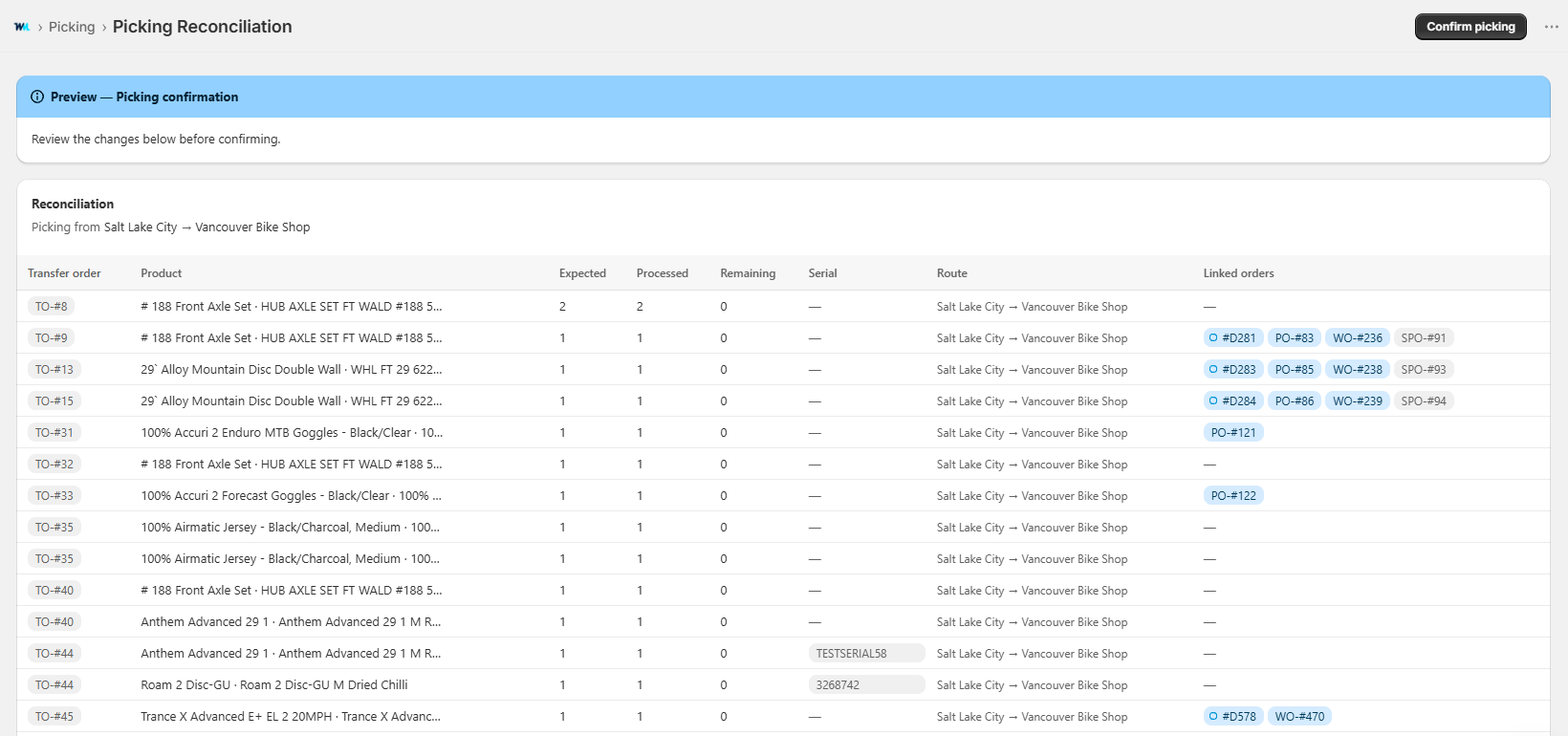
* **Preview and conciliation:** Before anything commits, a read-only preview shows expected, processed, and remaining quantities for every item, with skipped items left out. Confirming from this screen commits the status changes, records serials, and generates the activity's document.
* **Documents and audit trail:** Every finalized activity creates a Picking, Shipment, or Receipt document. A Documents view lists them with type, date, route, item count, staff member, and processed totals, and each opens to a full line-by-line breakdown. Documents can also be opened from the related transfer orders.
* **Save and resume drafts:** Staff can save an activity mid-way and come back to it later from Continue Activity, with activity type, locations, quantities, and serials all preserved. Resumed drafts are cleared automatically once the activity is finalized.
### **Purchase and Special Order Modules**
**Unified Special Order Merge Workflow**
Merging Special Orders into a Purchase Order now uses one consistent flow from both the Special Orders dashboard and the Purchase Orders "Merge Special Orders" screen. Both entry points share the same views and filters, so you can build a selection the same way no matter where you start, then create the PO through a single guided modal.
* **Line Item view on both entry points:** Both the Special Orders dashboard and the Merge Special Orders screen now have a Line Item view alongside the Special Order view, giving full line-item visibility to select exactly what to merge. Rows show the product, SPO number, supplier, and location, with checkboxes and a selected-items count. Fully ordered items are filtered out of the Merge screen automatically.
* **Shared, persistent filters:** A shared filter set (Location, Customer, Supplier, Product, Order State, Purchase Order State, Purchase Orders, and Work Orders) applies to both views, shows active filters as dismissible tags, and stays in place when you switch between the Special Order and Line Item views.
* **Create Purchase Order modal:** Selecting items opens a Create Purchase Order modal where you set the PO location, apply a supplier to all products or override individual lines, and adjust or clear quantities before creating. On the Special Orders dashboard, selecting items brings up a bulk toolbar to create a PO, merge with an existing PO, or delete.
* **Success confirmation:** After the PO is created, a banner with a direct link to the new Purchase Order appears and the create button disables to prevent duplicate submissions, so you can jump straight to the PO or keep working.
### **Employees Module**
**Custom Field Presets for Employees**
You can now save reusable presets of custom fields for staff member records, so commonly used fields are available on every employee without adding them one at a time. Create a preset from within an employee's Custom Fields panel by selecting the fields you want and clicking Save Preset. When setting up another employee, open the preset selector to apply a saved preset, either merging it into their existing fields (nothing is removed) or overriding their fields entirely. You can search across saved presets from the selector, and manage presets (view, edit, delete) from Settings. Mark a preset as the default and it is applied automatically to every newly created employee.
### **Serials Module**
**Product Information on the Serials Page**
The serials page now shows a product information card at the top when scoped to a specific product, including the product title, variant, SKU, and image. This makes it easy to confirm you are managing serials for the right product.
### **Work Order Module**
**Due Date Sort and Filter Handle Empty Dates Correctly**
Sorting by Due Date now keeps empty due dates at the end of the list in both directions, so real dates come first instead of a block of blanks. Date range filters exclude empty due dates by default, with an explicit option to include them.
### **Multiple Module Improvements**
**New Liquid Variables for Print Templates**
Store addresses can now be formatted with the city and province/state as separate values, so multi-location stores get proper formatting like `Vancouver, BC V5Y 1E4` without hardcoding. Work Orders also gain an Assigned Staff liquid variable, so the assigned staff member can be included on printed work order templates.
### **Comprehensive System Improvements**
This release includes extensive bug fixes and minor enhancements across multiple modules, including schedules, serials, purchase orders, rentals, work orders, employee management, add-ons, POS and admin services, price overrides, and payment systems. These improvements ensure greater system stability and enhanced user experience across all platform components.